Company knowledge, with access controls

Your company,understood.

Verity brings company knowledge together and gives employees clear answers using only the information they are allowed to see.

Secure by design

Company knowledge,
clearly connected.

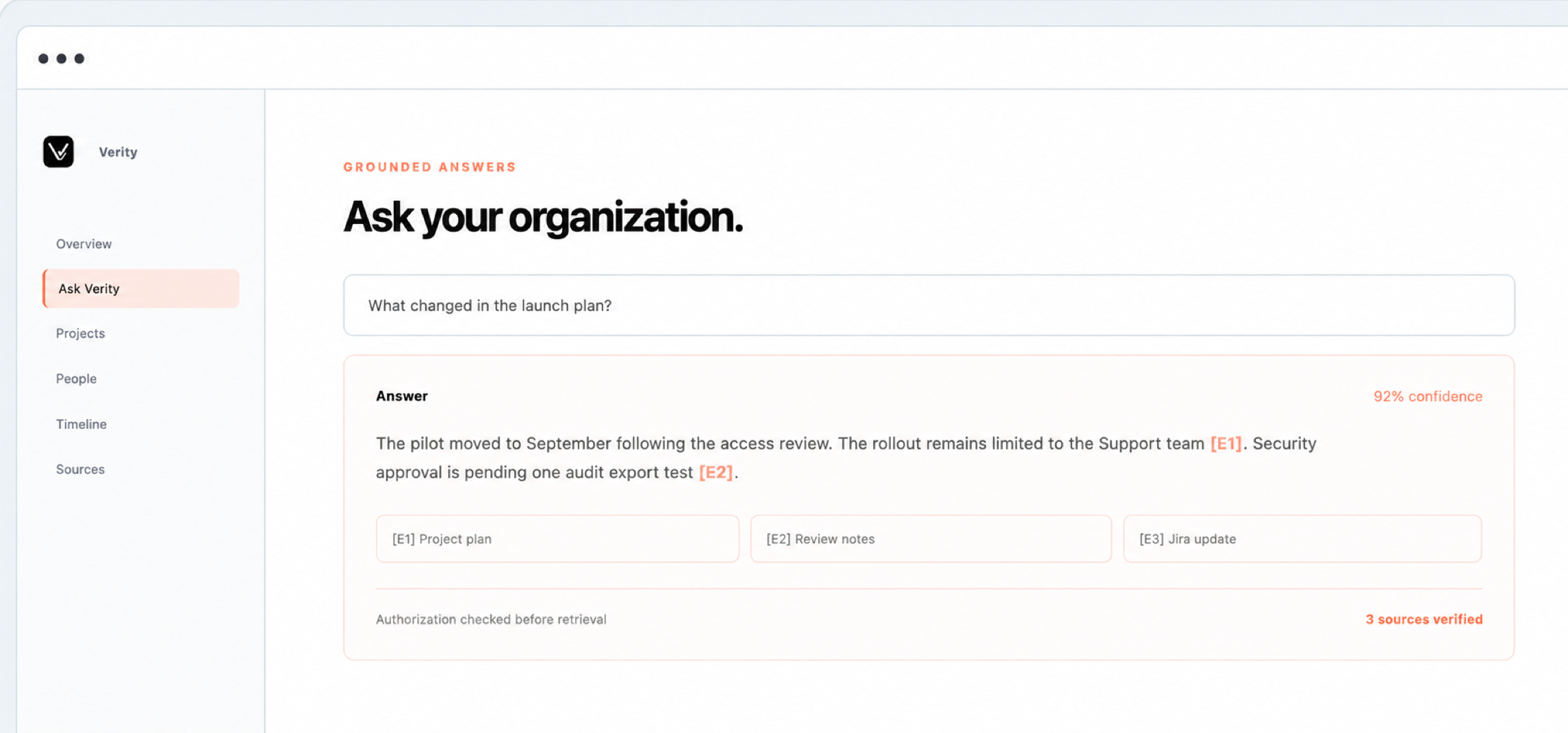
Ask questions across your company tools. Verity checks access first and shows the source behind every important claim.

Verity permission-aware answer workspace
Why Verity

Turn scattered knowledge into clear answers.

Important company knowledge lives across files, folders, projects, and workplace tools. Verity gives employees one place to ask questions, while preserving the access rules the company already uses.

01 · FIND

One place to ask

Employees ask a normal question instead of searching through different tools or waiting for a colleague to reply. Verity searches the company information available to that employee and returns a short answer.

Less time searching and fewer repeated questions.
02 · VERIFY

See where the answer came from

Important claims include a link to the supporting source and passage. Employees can open the evidence, check the context, and decide whether the answer is useful.

Answers can be checked instead of simply trusted.
03 · PROTECT

Keep private information private

Verity checks access before it searches. An employee receives evidence only from information they are already allowed to see. Unclear access is denied by default.

The same question can produce different evidence for different employees.
04 · REMEMBER

Keep company knowledge useful

Verity keeps connected information current as files change, permissions are removed, and teams move. Decisions and project history remain easier to find when employees or roles change.

Knowledge stays with the organization, not only with individuals.
The product

One secure place for company knowledge.

Verity connects your workplace tools while keeping their access rules. Employees get short answers with sources. Administrators stay in control of users, connections, permissions, and data.

01

Answers based on permissions

Verity checks each employee's role, team, groups, and source access before searching. Restricted information never enters the answer process.

Access denied by default when unclear
02

Answers with exact sources

Every important claim links to the source and supporting passage. If the evidence is missing or conflicting, Verity says so instead of guessing.

Open the proof behind each claim
03

Connected company knowledge

Verity links documents, people, projects, decisions, and events so employees can understand the full story across different tools.

People, projects, decisions, and timelines
04

Automatic updates

Verity finds new, changed, and deleted content. When access is removed in a source, it is also removed from future answers.

Only changes are synchronized
05

Administrator controls

Manage employees, roles, sessions, document access, connected sources, synchronization, settings, and data deletion in one place.

Clear status and recovery tools
06

Complete audit history

Verity records sign-ins, denied access, administrator actions, questions, and answers in a permanent audit history.

Actions remain traceable
Permissions

Access is checked before search.

Verity removes restricted information before searching, not after. Two employees can ask the same question and receive different evidence based on what each person is allowed to see.

Administrators can safely compare results for two employees. Restricted titles and content stay hidden.

Confirm the employee

Check the organization, role, department, groups, active session, and source permissions.

Identity

Remove restricted information

Exclude anything the employee cannot access. If a permission is unclear, Verity denies access.

Access

Choose the best evidence

Prioritize the most relevant, recent, trusted, and supported information without hiding conflicts.

Evidence

Answer with sources

Show only supported claims, explain uncertainty, and record the action in the audit history.

Answer
For administrators

Connect, monitor, and fix.

Administrators can always see what is connected, what was synchronized, and what needs attention.

Connected sources

Connect company tools securely and keep their files and permissions up to date.

  • Last successful update and next scheduled update
  • Files found, indexed, skipped, rejected, or deleted
  • Expired connections with a reconnect button
  • Failure alerts and manual retry controls
Google DriveMicrosoft OneDriveConfluence CloudPDFDOCXTXTMarkdown

Administrator workspace

Administrators can manage security and data without seeing employee questions or restricted evidence.

  • Users, departments, roles, and active sessions
  • Document access and permission testing
  • Synchronization status and file-processing errors
  • Security status, denied access, backups, and organization isolation
  • Organization-wide deletion with a clear audit trail
A safe first rollout

Start with one organization and prove that it works.

01 · SET UP

Create the organization

Add the company, administrators, departments, roles, security rules, and employees.

02 · CONNECT

Connect company sources

Sign in, approve access, run the first synchronization, and check file and permission status.

03 · TEST

Test employee permissions

Ask the same question as two employees and confirm that each person sees only permitted evidence.

04 · LEARN

Review pilot results

Track useful answers, citation quality, missing sources, permission errors, and response speed without exposing private questions.

Answers your company can verify.

01

Access checked first

Only information the employee can access is used in the answer.

02

A source for every important claim

Open the exact source and supporting passage behind the answer.

03

Permanent audit history

Questions, sources, permissions, and answers remain traceable.

Verity for macOS.

Built for Apple silicon Macs. Install once, then receive signed updates inside Verity.